



Get started learning to build your own electronics by following our FREE online courses below!
Learn More »
Categories
- animatronics (12)
- apple (11)
- arduino (179)
- art (41)
- articles (121)
- artificial intelligence (11)
- automation (421)
- avr (205)
- bitcoin (3)
- breadboard (9)
- cameras (57)
- cars (26)
- cell phones (28)
- clothing mods (21)
- console mods (26)
- dangerous (94)
- desktop mods (24)
- embedded (5)
- flying things (54)
- fpga (22)
- gaming creations (108)
- interface (225)
- internet (17)
- laptop mods (6)
- lasers (22)
- linux (7)
- magnetic (3)
- medical (12)
- microcontrollers (51)
- misc projects (152)
- msp (12)
- music (124)
- pic (90)
- projects (23)
- pyroedu (76)
- raspberry pi (26)
- robots (312)
- security (36)
- sensors (307)
- software (200)
- solar (19)
- stamp (9)
- tools (149)
- tutorials (98)
- Uncategorized (45)
- usb (44)
- wireless (256)
Sponsors
Build Like A Pyro!
Find many of the parts used on this site at our favorite online electronics shop


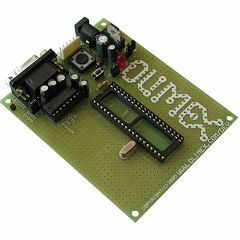
Programming The PIC
Posted October 14, 2007 by Chris
Expanding upon the previous tutorial where we learned how to connect a PIC to a host computer, we are now ready to actually program the PIC. This tutorial explains that process.
21 Responses to “Programming The PIC”
Leave a Reply
Currently Hot

An Introduction To Verilog
a small tutorial on using verilog with a cpld

Altera’s UP2 Board
learn about the up2 & create a 4-bit full adder

Build A CPLD Dev Board
make your own cpld development board

Build A ByteBlaster
build a cable so you can program your fpga/cpld

Interfacing A PIC To LCD (16×2)
control an lcd display with a pic
Animatronics

Recent Articles

Arduino DDS Shield
build your own arduino based analog signal generator

A Digital Multimeter In Review (Tenma 72-7735)
learn about your typical digital multimeter in review

The PIC Annoy PCB
build something to annoy your co-workers

Automate Your Life With Cron
learn how to use cron for computer automation

Web Scraping For Weather Updates
learn how to use php to scrape the web

Creating A Web Server In Linux
learn how to make a lamp web server in linux

Stepper Motor Control With A stepRocker TMCM-1110
learn how a commercial stepper motor controller works

Arduino To PIC Wireless Proximity Motor Control
control a motor with a distance sensor wirelessly

PIC to Arduino Wireless Communication via XBee
use xbee to make a pic wirelessly talk to an arduino

Motor Control via Infrared Distance Sensor
control a motor simply by waving your hand


April 29th, 2008 at 1:14 pm
thanx. i will contact you if i have complications. 😀
August 15th, 2008 at 9:58 am
hi,im looking for information how to erase y reprogram a microcontroller o how to erase and put back information on it, for example i have a board that reads 50564 cuts,i need erase it and putback 70.567 cuts its that posible thank you for your helpp please helme on this baronangelj@hotmail.com
August 15th, 2008 at 10:06 am
To erase a microcontroller you’ll need a programmer or something that is able to communicate with your microcontroller. Erasing a microcontroller is virtually the same thing as re-programming it with no data.
December 4th, 2008 at 6:52 pm
Hi, I was wondering why the connection is made to the development board via
the Tiny ICD2 Pic programmer?. Is it possible to connect the serial cable straight to the development board to program the chip without using the Tiny programmer. I see there is a serial socket on the board.
excellent tutorial by the way
May 28th, 2010 at 3:31 am
I want to know that is this developement board available in India??
where could I find the addresses of the ports of the mcu?
Is there any manual available for OLIMEX Developement board?
Please help me.
My email id :
nilotpal.mahadani@gmail.com
April 15th, 2011 at 9:14 pm
hi chris
the only microcontroller that I can get is the ATmega16 microcontroller with its programming circuit and softwares. so can u help me on programming it using the AVR studio4. or can u inform me how to convert the program that u have used in PIC18F452.
Looking forward for your reply
bye………..
June 8th, 2012 at 3:05 am
dear sir.
i don’t have PIC but i have 8051 contoller, so tell me i programmed on this chip (8051)?
June 23rd, 2012 at 12:23 am
Thank you for the sensible critique. Me & my neighbor were just preparing to do a little research about this. We got a grab a book from our area library but I think I learned more from this post. I’m very glad to see such fantastic information being shared freely out there.
July 11th, 2012 at 4:35 am
I am using dsPIC33EP64GP504 can we code it using Mplab can i cant find it in select device i have 8.56 version of the software plsease help.
December 12th, 2013 at 5:31 pm
Can I buy this already made???!!!!
January 6th, 2014 at 4:33 pm
Ubot Studio Truth
Discussions of Ubot Studio bugs and short comings
exposed forum
April 4th, 2014 at 8:11 am
hello sir,
i am working on short range personal radar. i am getting problem in programming please help me.
Please send me some data which will helpful for me to understand programming or please me hex code.
thank you